Pricing
The price is on the screen before you book.

Your fare
The same lines for every vehicle
- 1Base fareSet by vehicle; half on Scheduled
- by vehicle
- 2Pickup payShare of the per-km charge
- 25%
- 3Drop chargeShare of the per-km charge
- 75%
- 4Loading helpAdd-on, only if you choose it
- optional
- 5Launch OfferFirst three bookings
- − 25%
- 6Platform feeOn the fare
- 7%
- 7GSTOn the platform fee only
- 18%
before you book
FARE EXPLAINER
What each line on the fare means.
Every fare is built the same way: what adds to it, what comes off it, then tax. The lines match the fare card above; amounts are set by vehicle, distance and time, and the app shows them before you book.

Adds to the fare
- 1
Base fare
Fixed per vehicle type. A two-wheeler and a truck start from different base fares. Scheduled bookings pay half the base fare.
- 2
Pickup pay
25% of the per-km charge for the route the app plans: the first 11 km at the vehicle’s standard rate, every km after that at a lower rate. Paid in full to the partner.
- 3
Drop charge
The other 75% of the per-km charge, also paid in full to the partner. Rush-hour, night, rain or high-demand surcharges apply only to this line, shown first. Scheduled bookings are never surcharged.
- 4
Add-ons
Only what you choose or what the trip needs: loading help, extra stops, waiting after the free time, tolls and parking at actual.
Comes off the fare
- 5
Offer
One offer per booking, taken off the fare: 25% off your first three bookings, or Wait & Save with Flex 15 on a two-wheeler.
Platform fee and GST
- 6
Platform fee
7% of the fare, not charged on surcharges or add-ons.
- 7
GST
18% on the platform fee, on its own line. Business bookings get a GST invoice to your GSTIN.
One number, shown before you book.
The same breakdown appears again at payment and on the invoice that comes with your proof of delivery.
SAVINGS OPTIONS
Three ways to pay less. Offers apply at payment.
Each saving is a trade: a little flexibility for a lower fare. Here is how to get each one.
Wait & Save
Give us up to 15 minutes to match your two-wheeler booking: 10% off at once, up to 30% when matched.
How to get it: Unlock Flex 15 by referring 3 friends, then choose Wait & Save before you book.
Smart Return Saver
Coming soon: give a flexible pickup window on a scheduled booking and we match you with a partner already heading your way.
How to get it: Not available yet. It will show in the app when you schedule.
Capacity Share
Book part of an Eicher 14 ft or 17 ft truck when your load does not need all of it: 40%, 60% or 80% of the scheduled whole-vehicle fare for a quarter, half or three quarters.
How to get it: Pick Capacity Share and the space you need when you schedule.
Flex 15Wait 15 minutes. Pay less.
Give us up to 15 minutes to match your two-wheeler delivery with a partner already heading your way. You save 10% at once, and up to 30% when we find a match.
 Get the app to refer
- Invite 3 friendsShare your invite link from the Flex 15 card in the Movezo app.
- They make a first deliveryEach new friend signs up with your link and completes a first paid delivery.
- Flex 15 unlocksWait & Save is yours for 6 months.
- Two-wheeler bookings only, up to 10 bookings a month. Not combined with the Launch Offer. The extra saving is shown once a match is confirmed and refunded to your payment method.
PAYMENT OPTIONS
Pay the way that suits you.
Pay in the app when you book. Every payment runs through Razorpay, shows the full fare breakdown first, and sends a receipt to the app straight away. Cash and pay on delivery are not accepted.
- No surprises at the gateThe amount you pay is the one you saw before booking. Partners cannot change it.
- Receipt and invoice every timeA receipt in the app at once, and a GST invoice with your proof of delivery.
- Built for business tooPrepaid in the app, with your company name and GSTIN on every invoice.

UPI apps
Pay from any UPI app in a tap, through Razorpay.
Cards and net banking
Debit cards, credit cards and net banking.
IN THE APP
Every charge, shown before you pay.
The vehicle list shows each price, payment shows the full breakdown, and the invoice lands with your proof of delivery.
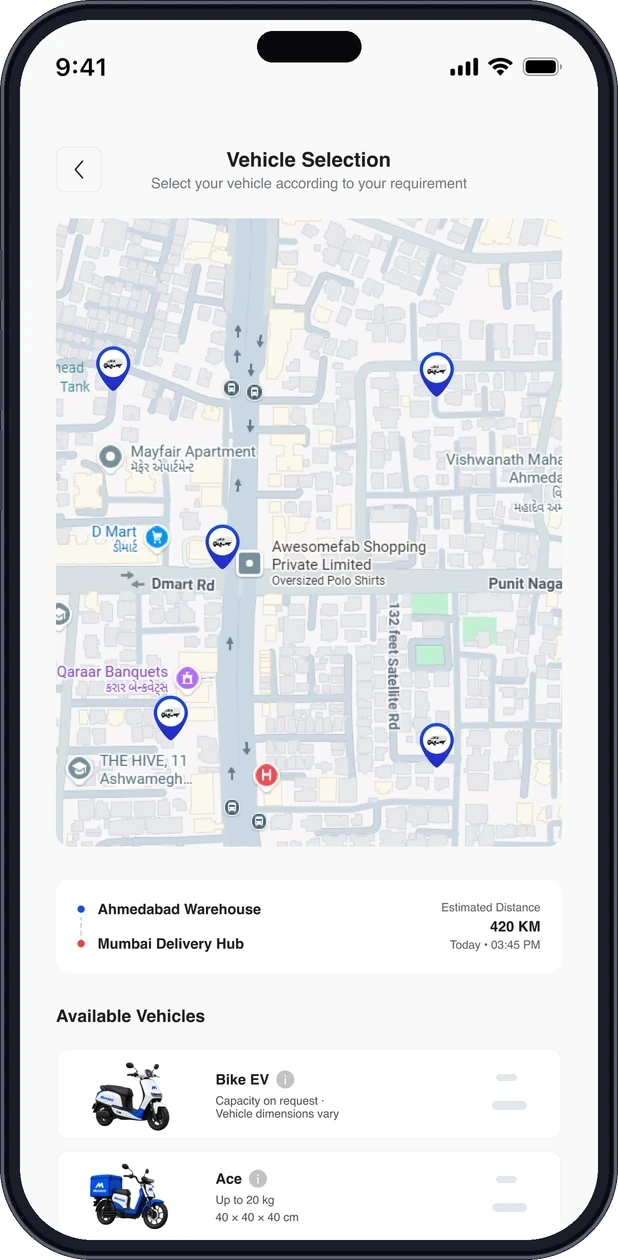
1. Price per vehicle
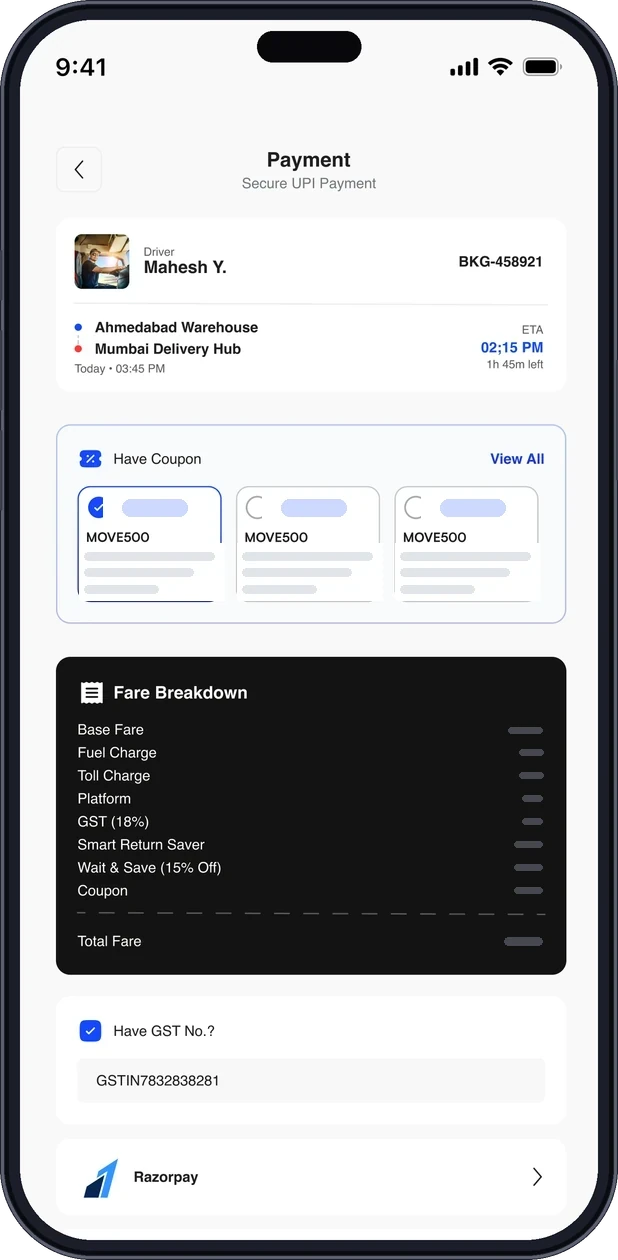
2. Fare breakdown
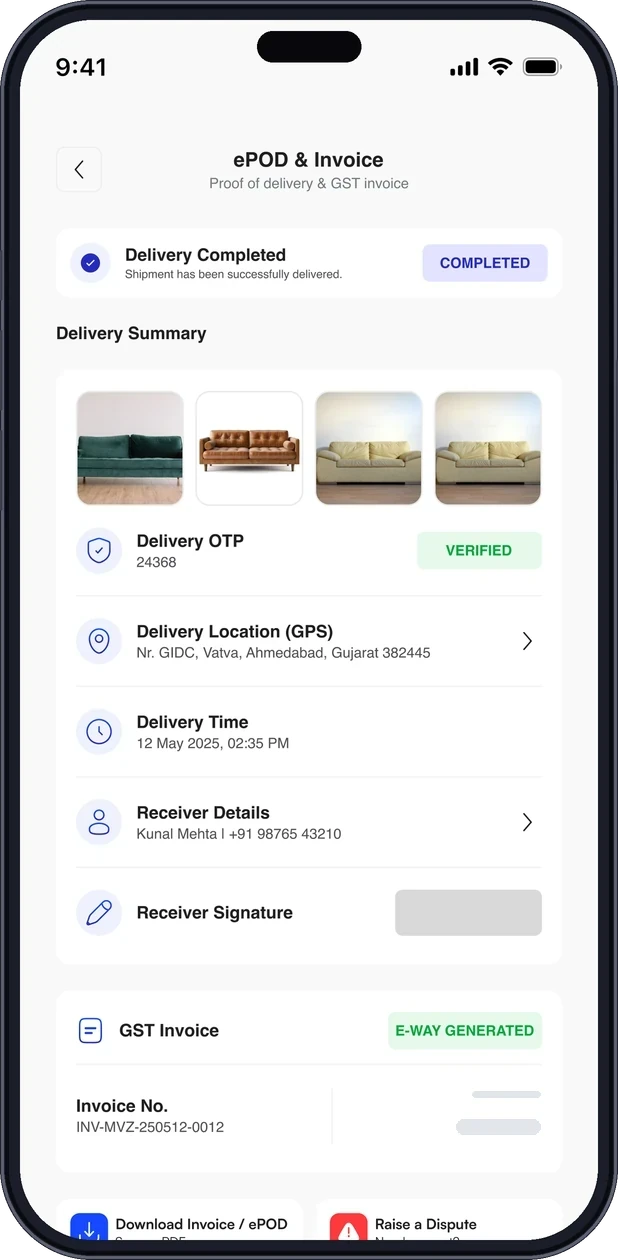
3. Invoice with ePOD
THE FINE PRINT, IN PLAIN WORDS
Waiting, changes, cancellation, refunds.
| Situation | What happens |
|---|---|
| Waiting at pickup or drop | What happens:Free waiting at pickup and at drop (10 minutes on a two-wheeler, up to 60 on a 17 ft truck), then a per-minute charge by vehicle. The timer and the charge show in the app. |
| Changing the drop | What happens:One drop change per trip. The new fare is shown first and only applies if you accept it. |
| Cancelling | What happens:Free until 60 seconds after a partner is assigned. Then a small fee, depending on how far the partner has come, shown before you confirm. |
| Refunds | What happens:Started within 24 hours to the original payment method (1-3 business days on UPI, 5-7 on cards), or instantly as Movezo Credits if you choose. |
Home shiftingComing soon
Coming soon. Priced after a free survey: inventory, packing, crew, vehicle and access in one fixed quote, or bids from verified partners.
Learn more →Office shiftingComing soon
Coming soon. Priced after a site survey, with 50/50, milestone or credit terms and a retention released after the snag window.
Learn more →FAQ
Questions, answered.
Short answers to what people ask most. Can’t find yours? Our support team is a message away.
What is Flex 15?


Flex 15 is Wait & Save for two-wheeler bookings. You give us up to 15 minutes to match your delivery with a partner already heading your way, and save 10% of the fare at once, up to 30% when we find a match, with a cap per booking shown in the app.
How do I unlock Flex 15?
Share your invite link from the Flex 15 card in the Movezo app. When 3 new friends sign up with it and each completes a first paid delivery, Flex 15 unlocks for 6 months. It cannot be combined with the Launch Offer.
How is the fare worked out?
From the vehicle’s base fare (half of it on a scheduled booking), Pickup pay and the Drop charge (the per-km charge for your route, split 25:75), any tolls and the extras you add, less one offer, plus the 7% platform fee and GST on that fee. Every line shows before you book.
How can I pay?
UPI, debit or credit cards and net banking through Razorpay, paid in the app when you book. Cash and pay on delivery are not accepted, so never pay a partner outside the app.
Where do I enter an offer code?
Codes you copy from the app are pre-filled at payment, and the discount shows before you pay.
Will I get an invoice?
Yes, every completed booking has an invoice in the app. Business accounts get a GST invoice to their GSTIN.

YOUR FARE
See your price in the app.
Delivery fares are shown before you book. Shifting is priced after a free survey; office terms include retention.